Shift4 Dine Onboarding Guide

1. Welcome to Your Shift4 Onboarding Experience
We’re thrilled to partner with you and help power your business with Shift4! This guide outlines each key step — from account setup to installation and go live — to ensure your POS system is set up for success from the start.
Your Pre-Launch Specialist will be your primary point of contact throughout this process. Together, we’ll ensure every detail is tailored to your business needs.
Please note, the Pre-Launch team is available Monday through Friday. If you require additional assistance outside of your Specialist's business hours, you can always reach us by visiting https://shift4.com/support.
2. Onboarding Timeline
The Shift4 Dine onboarding process typically takes about four weeks from start to finish. Timelines can vary depending on your installation schedule, location readiness, and menu preparation — but a little preparation helps keep everything running smoothly.
3. Start Your Setup
Please take a few moments to review this outline to help you move confidently through your Shift4 Dine onboarding process. While these tasks are listed in chronological order, many can be completed simultaneously.
3.1 Shift4 Dine Customer Hub Registration & Onboarding
Once your Shift4 application is submitted, you’ll receive an email inviting you to register for Shift4 Dine Customer Hub, your POS back office.
After registering for Shift4 Dine Customer Hub, complete the required tasks in your onboarding wizard. These steps include essential details about your business — such as contact info, menu items, and installation preferences.
The sooner you complete onboarding, the faster we can provision and ship your Shift4 Dine POS system.
Check out the introduction video for more details about onboarding.
3.2 Meet Your Pre-Launch Specialist
After your order is processed, your Pre-Launch Specialist will reach out to you via email and phone to introduce themselves, provide their contact details, and schedule a formal kickoff call.
Your assigned Pre-Launch Specialist (PLS) is assigned Monday through Friday, 8 AM to 5 PM ET. Please allow up to 24 hours for your PLS to be assigned, with additional time required during weekends and holidays.
3.3 Kickoff Call Essentials
Your kickoff call helps ensure a seamless launch. Please have the following details ready so your project stays on track.
Installation Essentials
- Tentative install date and time (based on readiness, menu completion, and availability).
- Tentative go-live date (based on installation completion).
Site Readiness
- Confirm your location meets network and installation requirements.
- Review the Site Readiness Guide to prepare your space.
Gift Card Conversion & Setup
- Existing Gift Card Program: If you have an existing gift card program that you’d like to migrate to Shift4, please complete this Conversion Form. Additionally, please review this workflow documentation, and decide whether you want to test your current gift cards for compatibility.
- New Gift Card Program: If you’d like to set up a new gift card program, navigate back to onboarding and select the gift card tile to create a new program.
Financial Configuration
- Tax Details: Amount, items/services taxed, and visibility (added/hidden).
- Surcharges: Delivery or service fees.
- Discounts: Happy hour, employee meals, friends and family, etc.
- Gratuities: Auto-gratuity triggers (e.g., large parties).
- Tipping Preferences: Does your business accept tips? Are tips distributed nightly (cash) or via paychecks?
Shipping & Equipment
- Equipment List: Verify accuracy of items being shipped.
- Addresses: Confirm shipping and installation locations.
- Shipping Method: Standard or expedited.
Business Contacts
- Primary contact name, email, and phone.
- Menu contact for any menu-related questions.
Hardware Configuration & Table Layout
- Printers and KDS Labels: Names for remote printers and kitchen display systems (e.g., expo, grill, bar).
- Table Layout: If using table-based ordering, ensure your floor plan is set up in onboarding.
Menu & Employees
- Menu Structure: We will review all menus you provided and ask any clarifying questions.
- Employee Setup: Employee roster, 4-digit PINs to access the system, and permissions (e.g., manager vs. staff access).
- Clock In/Out: Will employees clock in/out via the POS Workstation, or only use it for orders?
- Online Ordering: Do you need Online Ordering set up? Will you integrate with third-party online ordering vendors like DoorDash or Uber Eats? Will you need QR Code ordering and payments?
4. Schedule Your Menu Presentation
Your Pre-Launch Specialist will estimate the time required to program your menu, then schedule a Google Meeting to review your setup about a week before installation. This gives you time to request any changes — and, if needed, a follow-up presentation to confirm updates.
5. Additional Resources & Training
While your system is being programmed, we highly recommend visiting the Resource Center for helpful tutorials and guides. The more familiar you are with Shift4 Dine before go-live, the faster your team will be up and running.
6. The Final Countdown
Once your kickoff call is complete, your Pre-Launch Specialist will:
- Email you a recap.
- Send your order to deployment for shipment.
- Begin programming your Shift4 Dine POS system.
An Installation Coordinator will contact you to confirm your installation date and time. Please ensure you or someone from your staff will be onsite for the installation, and verify that the necessary employees will be available for training.
7. Grow My Business Setup
Once your core setup is complete in onboarding, take advantage of the Grow My Business section in Shift4 Dine Customer Hub.
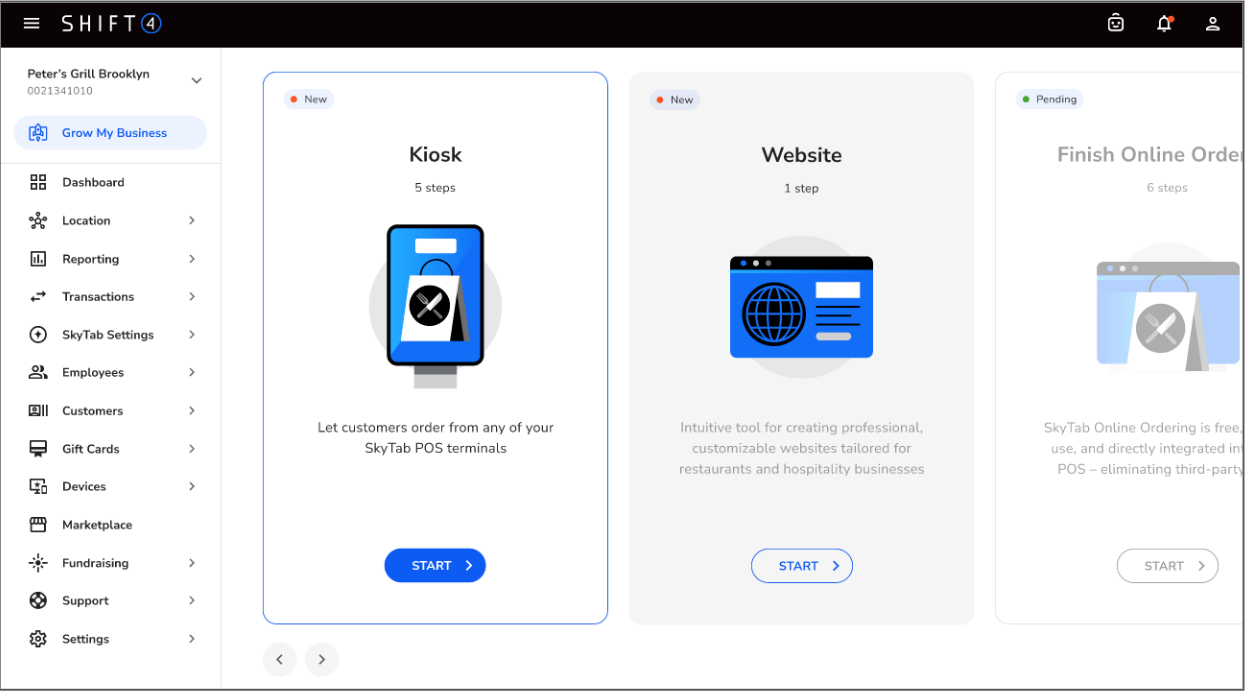
This area helps you unlock Shift4 Dine's full potential — with tools designed to grow revenue, increase loyalty, and enhance customer engagement.
7.1 Available Features
- Online Ordering: Configure your online ordering hours and settings.
- Gift Cards: Create or design new gift cards.
- Loyalty: Launch a loyalty program to reward regulars.
- Business Intelligence (BI): Access enhanced reporting with BI.
- Kiosk Setup: Easily add Kiosks for faster service.
7.2 Additional Options (after menu programming)
- Website Builder: Use our free site builder to customize your restaurant’s website.
- Employee Management: Adjust employee roles, permissions, and access.
- Discounts & Gratuities: Customize how discounts and tips apply.
- Finish Online Ordering: View your online menu layout and print QR codes.
Pro Tip: Exploring these features early helps you get more value from Shift4 Dine on day one — and gives you a head start on growing your business after launch.
8. Installation & Go Live
You’ll receive an email once your installation date and time are scheduled.
At least one day before, your installer will call to:
- Introduce themselves.
- Confirm your installation date and start time.
- Ensure readiness for the installation.
- Answer any questions you may have.
Please make sure your site is prepared and that key staff are available for the install and training.
Installation Tips:
- Rescheduling requires at least 24-hours notice.
- Missed or late cancellations may incur a $200 scheduling fee.
- Date changes may delay your go-live date.
9. Ongoing Support After Installation
The day after installation, your Pre-Launch Specialist will check in to confirm that everything went smoothly. Your account will then transition to your Post-Launch Specialist for 2–4 weeks of continued guidance and support.
Your Post-Launch Specialist will:
- Provide additional or refresher training
- Help troubleshoot issues as you start daily operations
- Share best practices and workflow tips
- Monitor your system and follow up regularly
- Coordinate with Shift4 teams if further support is needed
The Post-Launch Team is available Monday–Friday during business hours.
For after-hours help, contact 24/7 Support at (888) 276-2108 or via chat in Shift4 Dine Customer Hub.
At the end of your Post-Launch period, your Specialist will confirm all open items are resolved before transitioning your account to our long-term Support Team, ensuring you always have help when you need it.